Below is a short guide on how to set up your HubSpot account.
If you have any questions or encounter any issues, please contact us and we will help resolve the problem.
1. Log in to the Account
-
You will receive an email invitation granting you access to HubSpot.
-
Open the email and follow the link to log in.
-
Enter your work email address, click Next, and select Sign in with Microsoft.
-
After logging in for the first time, complete the HubSpot setup form.
-
Set up two-factor authentication (2FA) to secure your account.
You are in! 🎉
2. Set Up Your Profile
-
Go to Settings.
-
Open Profile.
-
Fill in your information (name, contact details, etc.).

4. Click Save pop-up at the bottom left corner
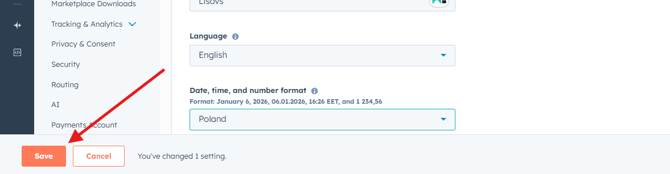
For now, completing your profile settings is enough.
For “Date, time, and number format,” you can choose Poland or any other format that is convenient for you
Feedback
This is a new beginning for the AGroup with HubSpot adoption, and we highly appreciate any feedback regarding HubSpot and your experience using it.
Your input will help us improve processes and grant additional access where needed